
AI agent authorization with A2A protocol and HashiCorp Vault

As organizations continue to use more AI agents, they encounter the challenge of managing dynamic non-human identities (NHIs). The current paradigm of identity and access management assumes deterministic access. For example, you might request access to service A and service B. If you need access to service C, you proactively request it. On the other hand, agents push the boundaries of identity and access management, as they have the autonomy to access other agents and systems non-deterministically. How does least privilege access management apply to AI agents?
In this post, you’ll learn how to secure and audit agents using the Agent2Agent (A2A) protocol with HashiCorp Vault as an OpenID Connect (OIDC) identity provider. By assigning an identity to a user, A2A clients (client agents) can authenticate to Vault and retrieve an access token for authorization to an A2A server (server agent). When client agents require additional access to other server agents, they can request Vault to add additional scopes and get a new set of credentials. You can issue temporary credentials to each agent and audit access requests through Vault. Authenticating agents through Vault authentication methods and authorizing scopes to control access to other agents using Vault helps prevent and identify privilege compromise.
Configure Vault as an OIDC identity provider
Vault’s identity secrets engine enables Vault to act as an OIDC identity provider or generate JSON Web Tokens (JWTs) with specific claims. When a client agent uses Vault as an OIDC identity provider, it redirects the end user to log into Vault with the browser. Vault authenticates the user and checks the scope claims requested by the client against supported scopes configured in the provider. Vault returns an ID and an access token to the client agent. The client agent authenticates to the server agent with the access token, which the server agent evaluates for the correct claims. For more information on OpenID Connect, refer to the official documentation.
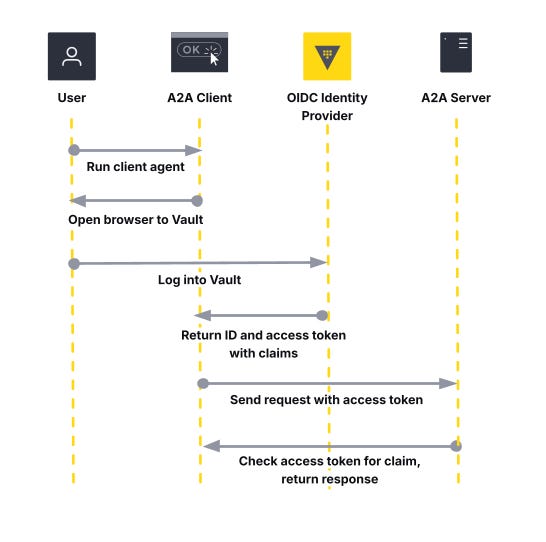
This workflow allows you to use Vault to downscope the agent’s access to skills or other agents. Reducing the agent’s permissions reduces the overall security risk of an agent accessing an unauthorized resource or exploiting another entity with privileged access.
Start by defining a set of Vault identity entities and assigning them to the OIDC identity provider. These entities can be users and groups from an authentication provider. These entities reflect an end user, such as a developer on a local agent, who needs to access remote agents. After creating the identity entities for users and groups, set up an OIDC assignment. The example uses the Vault provider for Terraform to define an OIDC assignment for a single end user entity and group.
resource "vault_identity_oidc_assignment" "end_user" {
  name = "${local.end_user}-assignment"
  entity_ids = [
    vault_identity_entity.end_user.id,
  ]
  group_ids = [
    vault_identity_group.agent.id,
  ]
}
Next, create an OIDC client. This allows the A2A client to request a client ID and client secret for an OAuth 2.0 authorization code flow. The redirect URIs should refer to the address of the client agent. Add the assignment created for the user and group to the OIDC client. The ID token TTL sets the amount of time for client authentication, while the access token TTL sets the expiration time for client authorization to a resource, such as an agent skill.
resource "vault_identity_oidc_client" "agent" {
  name = "agent"
  redirect_uris = [
    "http://127.0.0.1:9998/callback",
    "http://localhost:9998/callback",
  ]
  assignments = [
    vault_identity_oidc_assignment.end_user.name,
  ]

  # ID token for client authentication (1 hour)
  id_token_ttl     = 3600

  # Access token for authorization to agent skills (2 hours)
  access_token_ttl = 7200
}
Attach a Vault policy to the identity entity (such as the end user) to authorize against the OIDC identity provider. Follow the principle of least privilege. The end user has sufficient permissions to complete the OIDC authorization code flow but not access to the OIDC client credentials, as those belong to the client agent.
resource "vault_policy" "agent_oidc" {
  name = "helloworld-agent-oidc"
  policy = <<EOT
path "identity/oidc/provider/agent/authorize" {
  capabilities = [ "read" ]
}
EOT
}
Configure an OIDC scope, which defines client authorization to a resource. This example allows an A2A client to access a “read” skill for the “hello_world” agent. The client agent must include this scope during authorization to access the server agent.
resource "vault_identity_oidc_scope" "helloworld_read" {
  name        = "helloworld-read"
  template    = <<EOT
{
  "hello_world": "read"
}
EOT
  description = "helloworld read scope"
}
Define the OIDC provider. Add the scope to the list of supported scopes and include the OIDC client as part of the list of allowed client IDs. Update the issuer host to reflect the Vault endpoint that the client agent must access to retrieve the OIDC configuration.
resource "vault_identity_oidc_provider" "agent" {
  name          = "agent"
  https_enabled = true
  issuer_host   = replace(local.vault_public_endpoint_url, "https://", "")
  allowed_client_ids = [
    vault_identity_oidc_client.agent.client_id
  ]
  scopes_supported = [
    vault_identity_oidc_scope.helloworld_read.name,
  ]
}
Configure a headless Vault authentication method, such as the Kubernetes or SPIFFE auth methods, for the client agents. The client agents require initial Vault authentication to generate a client ID and secret. The client authentication method should reference a policy with the minimum permission to read the client ID and secret from the OIDC client.
resource "vault_policy" "agent_oidc_client" {
  name = "helloworld-agent-oidc-client"
  policy = <<EOT
path "identity/oidc/client/agent" {
  capabilities = [ "read" ]
}
EOT
}
Server agents do not need an additional Vault policy to retrieve OIDC configuration. In the authorization code flow, the server agent verifies the access token against the UserInfo endpoint. After setting up permissions for the end user to authorize against Vault’s OIDC endpoint and the client agent to retrieve a client ID and secret, create an A2A client and server agent.
Note that OIDC authentication and authorization require a browser. For a headless approach, consider using Vault identity tokens. This involves setting up an OIDC role in Vault tied to the scope you want to include. The A2A client requests a JWT directly from Vault’s OIDC token endpoint (e.g., identity/oidc/token/<role>) while the A2A server needs access to introspect the JWT for verification (e.g, identity/oidc/introspect).
Set up security schemes for the A2A server
Agent2Agent protocol standardizes communications between agents and enables agent discovery using Agent Cards. Agent Cards include security schemes to secure a server agent’s endpoints. Use these security schemes if you want to restrict certain skills or agents to authenticated clients only. This requires defining an extended agent card.
Add the OpenIdConnectSecurityScheme to the A2A server’s Agent Card. The security scheme must include the OpenID Connect URL (well-known configuration endpoint) from Vault, and the security object must include a required scope. This example uses the A2A Python SDK to require client agents to have the hello_world:read scope to authorize access to the server agent’s extended card.
if __name__ == "__main__":

## additional code omitted for clarity

    if OPENID_CONNECT_URL:
        security_schemes["oauth"] = SecurityScheme(
            root=OpenIdConnectSecurityScheme(
                description="OIDC provider",
                type="openIdConnect",
                open_id_connect_url=OPENID_CONNECT_URL,
            )
        )
        security.append({"oauth": ["hello_world:read"]})

    skill = AgentSkill(
        id="hello_world",
        name="Returns hello world",
        description="just returns hello world",
        tags=["hello world"],
        examples=["hi", "hello world"],
    )

    extended_skill = AgentSkill(
        id="super_hello_world",
        name="Returns a SUPER Hello World",
        description="A more enthusiastic greeting, only for authenticated users.",
        tags=["hello world", "super", "extended"],
        examples=["super hi", "give me a super hello"],
    )

    public_agent_card = AgentCard(
        name="Hello World Agent",
        description="Just a hello world agent",
        url=AGENT_URL,
        version="1.0.0",
        default_input_modes=["text"],
        default_output_modes=["text"],
        capabilities=AgentCapabilities(streaming=True),
        skills=[skill],
        supports_authenticated_extended_card=True,
        security_schemes=security_schemes,
        security=security,
    )

    # This will be the authenticated extended agent card
    # It includes the additional 'extended_skill'
    specific_extended_agent_card = public_agent_card.model_copy(
        update={
            "name": "Hello World Agent - Extended Edition",
            "description": "The full-featured hello world agent for authenticated users.",
            "version": "1.0.1",
            "skills": [
                skill,
                extended_skill,
            ],  # Both skills for the extended card
        }
    )

   app.add_middleware(
        AuthMiddleware,
        agent_card=public_agent_card,
        public_paths=["/.well-known/agent-card.json"],
        vault_client=vault_client,
        openid_connect_url=OPENID_CONNECT_URL
    )

    uvicorn.run(app, host="0.0.0.0", port=9999)
The server agent adds middleware to check client authorization to skills and other endpoints. Define a middleware class to handle authorization when a client agent requests the server agent’s extended card. This involves three steps:
Get the UserInfo endpoint from the OpenID Connect URL.
Use the access token to authenticate to the UserInfo endpoint and get information about the token’s claims.
Verify the scopes in the claims match those required by the server’s agent card.
The server agent in the example uses Python to authorize that the client agent has the correct scopes to access extended skills.
## additional code omitted for clarity

class AuthMiddleware(BaseHTTPMiddleware):
    def __init__(
        self,
        app: Starlette,
        agent_card: AgentCard,
        public_paths: list[str],
        vault_client: hvac.Client | None,
        openid_connect_url: str | None,
    ):
        super().__init__(app)
        self.agent_card = agent_card
        self.public_paths = set(public_paths or [])
        self.vault_client = vault_client
        self.openid_connect_url = openid_connect_url

        scopes = get_scopes_from_agent_card(self.agent_card)
        self.a2a_auth = {"required_scopes": scopes}

    async def _get_userinfo_endpoint(self) -> str | None :
        try:
            config = httpx.get(
                self.openid_connect_url
            )
            return config.json()['userinfo_endpoint']
        except Exception as e:
            logger.error(f"Failed to get OIDC provider config: {str(e)}")
            return None

    def check_oidc_scopes(self, userinfo):
        missing_scopes = [ ]

        if self.a2a_auth["required_scopes"]:
            for scope in self.a2a_auth["required_scopes"]:
                scope_key, scope_value = scope.split(":")
                if (
                    scope_key not in userinfo.keys()
                    or scope_value != userinfo.get(scope_key)
                ):
                    missing_scopes.append(scope)

        return missing_scopes


    async def dispatch(self, request: Request, call_next):
        path = request.url.path

        # Allow public paths and anonymous access
        if path in self.public_paths or not self.a2a_auth:
            return await call_next(request)

        # Authenticate the request
        auth_header = request.headers.get('Authorization')
        if not auth_header or not auth_header.startswith('Bearer '):
            return self._unauthorized(
                'Missing or malformed Authorization header.', request
            )

        access_token = auth_header.split('Bearer ')[1]

        try:
            missing_scopes = []

            if self.a2a_auth:
                if self.openid_connect_url:
                    userinfo = await self.get_userinfo(access_token)

                    if not userinfo:
                        logger.error(f"Invalid or expired access token")
                        return self._unauthorized(
                            f"Authentication failed: invalid or expired access token",
                            request,
                    )

                    missing_scopes = self.check_oidc_scopes(userinfo)

            if missing_scopes:
                logger.error(f"Missing required scopes: {missing_scopes}")
                return self._forbidden(
                    f'Missing required scopes: {missing_scopes}', request
                )

        except Exception as e:
            return self._forbidden(f'Authentication failed: {e}', request)

        return await call_next(request)
When a client agent wants to access the server agent, it needs to have the required scopes to access extended skills. Otherwise, it can reach out to the server agent and use public skills. The server agent only requires the OpenID Connect URL and the access token from the client to verify the delegated claims.
Enable authorization code flow in the A2A client
A client agent that needs to access a server agent must use an OAuth 2.0 authorization code flow to retrieve an access token. This includes a set of client credentials tied to the client agent’s identity. If the client agent runs on Kubernetes, the client can use the Kubernetes or SPIFFE authentication method to get client credentials from Vault.
The example A2A client uses a Vault token generated from the userpass auth method to request client credentials from Vault. Instead of using a temporary Vault token, your A2A client can include code to directly log into the authentication method. The OIDC authentication configuration defines the redirect URL and scopes requested by the client agent.
class OIDCAuthenticationConfig:
    def __init__(self, vault_client):
        self.redirect_uri_domain = REDIRECT_URI_DOMAIN
        self.redirect_uri_port = REDIRECT_URI_PORT
        self.redirect_uri_endpoint = REDIRECT_URI_ENDPOINT
        self.scope = OPENID_CONNECT_SCOPES
        self.vault_client = vault_client
        self._get_openid_configuration()
        self._get_client_secret()

    def _get_openid_configuration(self):
        self.authorization_endpoint = None
        self.token_endpoint = None
        try:
            logger.info(f"Attempting to get Vault OIDC provider config for {OPENID_CONNECT_PROVIDER_NAME}")
            response = self.vault_client.read(f"/identity/oidc/provider/{OPENID_CONNECT_PROVIDER_NAME}/.well-known/openid-configuration")
            self.authorization_endpoint = response['authorization_endpoint']
            self.token_endpoint = response['token_endpoint']
        except Exception as e:
            logger.error(f"Failed to get OIDC provider config for {OPENID_CONNECT_PROVIDER_NAME}: {str(e)}")

    def _get_client_secret(self):
        self.client_id = None
        self.client_secret = None
        try:
            logger.info(f"Attempting to get client id and secret for {OPENID_CONNECT_CLIENT_NAME}")
            response = self.vault_client.read(f"/identity/oidc/client/{OPENID_CONNECT_CLIENT_NAME}")
            self.client_id = response['data']['client_id']
            self.client_secret = response['data']['client_secret']
        except Exception as e:
            logger.error(f"Failed to client id and secret for {OPENID_CONNECT_CLIENT_NAME}: {str(e)}")

def authorization_code_flow(config):
    logger.info(
        f"Attempting to authenticate with OAuth2AuthorizationCode with scopes {config.scope}"
    )
    kwargs = dict(
        client_id=config.client_id,
        client_secret=config.client_secret,
        scope=config.scope,
    )

    auth = OAuth2AuthorizationCode(
        authorization_url=config.authorization_endpoint,
        token_url=config.token_endpoint,
        redirect_uri_domain=config.redirect_uri_domain,
        redirect_uri_port=config.redirect_uri_port,
        redirect_uri_endpoint=config.redirect_uri_endpoint,
        **kwargs,
    )
    return auth
The client agent retrieves the client credentials from Vault and opens a browser window for the end user to log into Vault. This allows Vault to authenticate the user and delegate permissions based on the scopes supported by the OIDC identity provider.
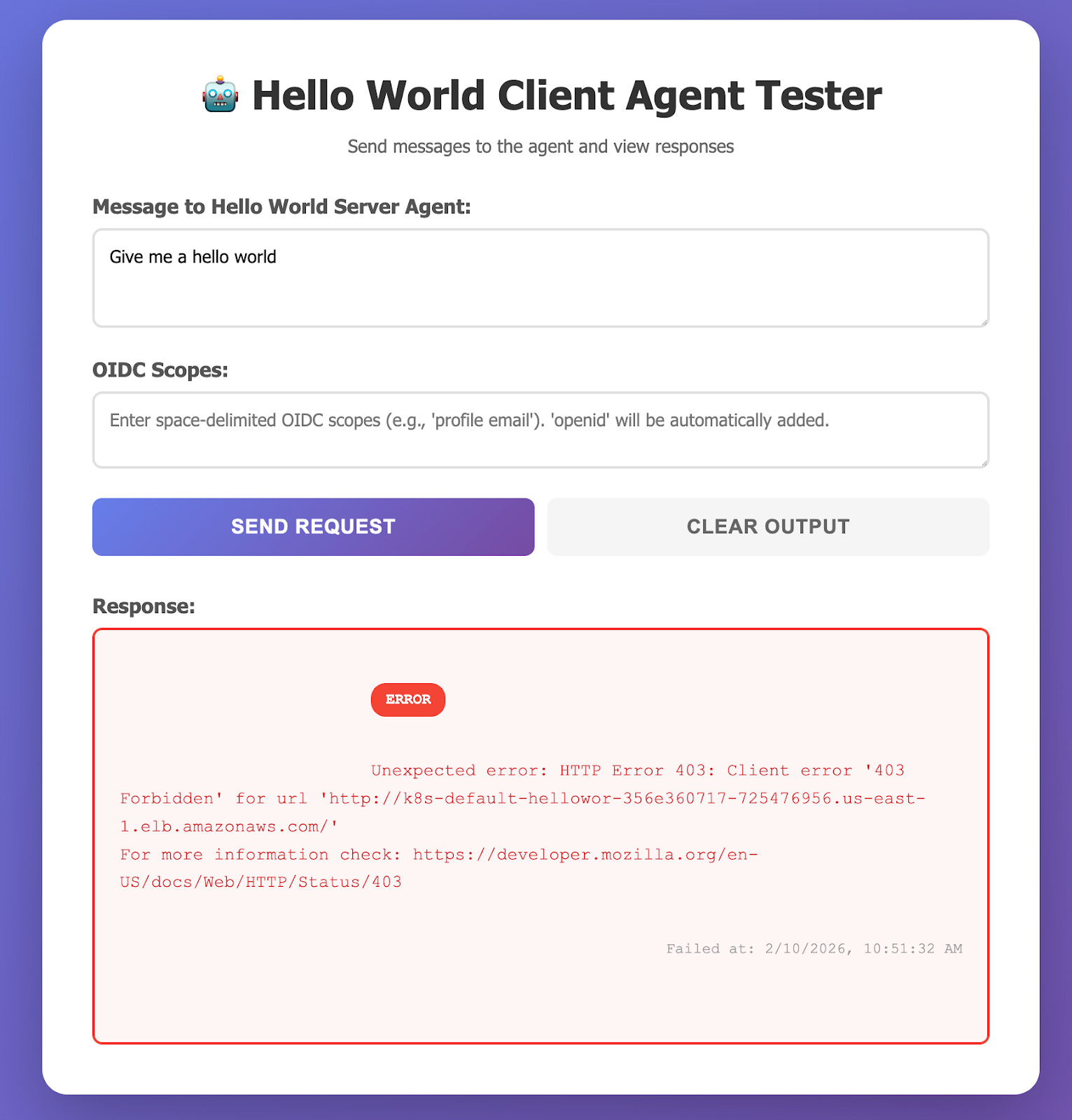
In the example, the client agent includes a UI that allows you to specify scopes. When you do not pass the correct scopes, the server agent returns an error for the missing scopes.
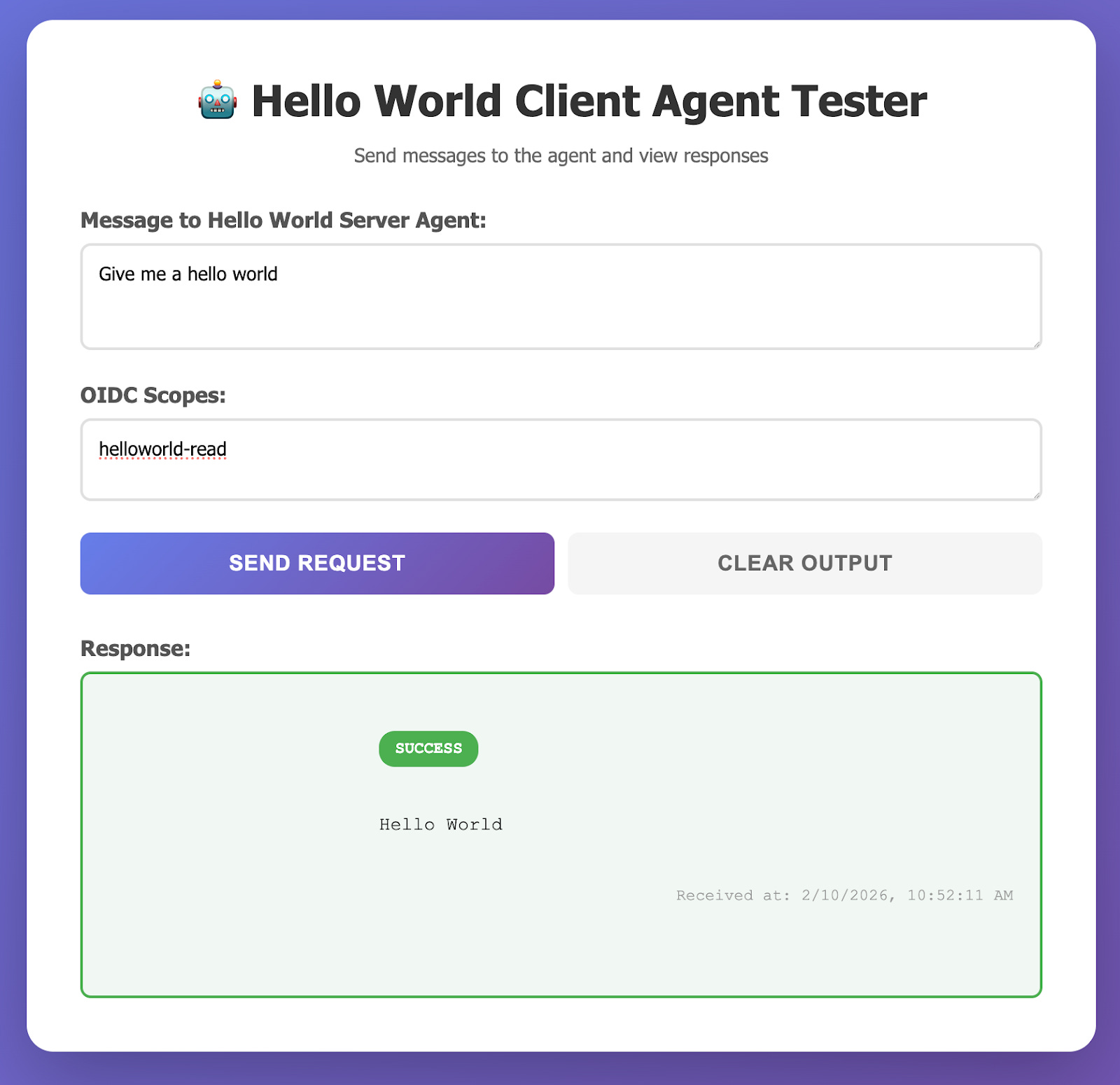
When you specify a required scope, the client agent can connect successfully to the server agent.
The Vault audit logs keep track of the OIDC authorization code flow. As a first step, the client agent gets information about the OIDC configuration. Second, it requests the client credentials from identity/oidc/client/agent. Third, the OIDC flow redirects the end-user to authorize the client agent request using the Vault UI. Finally, the server agent uses the UserInfo endpoint to verify the claims.

In addition to tracking the client requests, the Vault audit logs can track server agent requests made to the UserInfo endpoint. The request headers include the user agent, which shows whether the request came through the browser as part of the OIDC flow or from the server agent (written in Python). For more information on the fields available in the Vault audit logs, review our documentation on the audit log entry schema.
Learn more
Agent-to-agent authentication and authorization remain a complex challenge in balancing least privilege permissions with just-in-time access. This balance avoids a confused deputy problem (an agent coerces another entity with more permissions to perform an action) or implicit privilege escalation (agents exploit overly permissive tools to access unauthorized resources). By combining OAuth 2.0 with an identity provider, you can dynamically assign and audit access requests across agents. Vault’s authentication methods ensure that agents must authenticate to Vault before it can serve as an identity provider for access to another agent or system with delegated or explicit permissions. Each agent can use an NHI based on a Kubernetes service account, SPIFFE, or other approach.
Check out our validated patterns for a full explanation on using Vault with an identity provider to secure AI agents. Learn more about how to set up the OIDC identity provider in our tutorials. The demo repository for this post includes full example code for configuring an A2A agent server and client on Kubernetes with Vault as an OIDC identity or identity token provider. It references the Python examples for the A2A protocol. For more information on the A2A protocol, including security, check out its documentation. Review additional configuration options for the Vault identity secrets engine and various authentication methods for your use case.