
Better together: SPIFFE and HashiCorp Vault
Learn how to authenticate SPIFFE workloads to Vault and bridge the gap between SPIFFE-enabled and legacy systems. This blog assumes that you understand SPIFFE and SPIRE.

Most organizations struggle to give workloads consistent identities across heterogeneous environments. SPIFFE (Secure Production Identity Framework for Everyone) solves this by providing a cryptographic, platform-agnostic workload identity framework. SPIRE is a production-ready implementation of the SPIFFE APIs. When you are using SPIFFE and want to use Vault, HashiCorp Vault v1.21+ supports SPIFFE with SPIFFE Auth methods. Customers using SPIRE/SPIFFE in their environment can authenticate to Vault using SPIFFE Verifiable Identity Documents (SVIDs).
This blog covers three ways Vault complements SPIFFE: (1) enabling SPIFFE-authenticated workloads to interact with systems that do not understand SPIFFE, (2) reducing blast radius through dynamic credentials, and (3) minting SVIDs through Vault when a full SPIRE deployment is not necessary.
This blog assumes a basic understanding of SPIFFE and SPIRE.
Bridging the gap: HashiCorp Vault roles in SPIFFE implementation
It is highly unlikely that all your workloads support SPIFFE. Some examples: third-party APIs, static passwords and keys (databases), JWTs, or certificates.
This is where Vault bridges the gap. Workloads can authenticate to Vault using their SVID to retrieve these secrets. For example, a SPIFFE workload accesses dynamic database credentials generated by Vault to create a record in a table.
Added benefits: Vault records every request in the audit logs, giving you a single place for your audit trails. Access control is enforced on each request, so only authorized workloads can retrieve their individual dynamic secret. Vault can generate dynamic secrets on demand, with short TTLs, minimizing exposure if they are ever compromised.
Common SPIFFE use cases with Vault
1. Hybrid workloads: Provide a consistent identity, like a passport, that is recognized across platforms. This improves auditing because you can trace which actions a workload performed, and you get consistent behavior.
2. Service mesh: Service meshes, like Consul or Istio, issue SPIFFE-compatible identities natively (or can integrate with Vault as an external CA). Workloads can use the same SVID to authenticate to Vault. The mesh handles mTLS transparently at the infrastructure layer through sidecar proxies. Read this blog for more details.
3. API gateway: Using the same SPIFFE ID, applications call the backend API through the API Gateway without the application handling the authentication logic.
4. Autonomous AI agents: These agents make independent decisions and take actions to achieve their goals without human intervention. This means each process makes an entirely different decision with the same code. SPIRE implementations give each agent an identity that allows them to be traceable in the audit logs. When new agents are spawned automatically, SPIRE grants each agent an identity, allowing them to use the SVID with Vault to access secrets to use with tools defined by the MCP servers.

Figure 1: An example of using a custom resource definition in SPIRE, where the SPIFFE ID can be based on the pod level
While SPIRE is a SPIFFE implementation, SPIFFE compliance does not require SPIRE. You can leverage the SPIFFE auth method in HashiCorp Vault without SPIRE.
Here are some SPIFFE implementation examples with HashiCorp Vault:
1. Without SPIRE: A notable example without using SPIRE is described in this blog post by engineers at Macquarie Bank. They used the SPIFFE ID as a consistent workload identity for auditing and to authenticate to Vault.
2. With SPIRE: For more details, refer to the GitHub repository, which is open source by SPIFFE. Many organizations like Netflix and Uber have adopted a SPIFFE implementation with SPIRE.
How to implement HashiCorp Vault’s SPIFFE auth methods
SPIFFE Auth methods implementation involves 4 steps:
1. Set up the trust bundle. This can be either with SPIRE or without.
2. Configure SPIFFE role: This role maps SPIFFE IDs to Vault policies
3. Minting of SVID can be generated with the Vault PKI secrets engine with URI SAN templates or JWT.
4. Login to Vault
Step 1: Set up a trust bundle
There are 4 profiles you can choose from when configuring SPIFFE. Which profile to choose from depends on your current setup. Refer to the API docs for more information
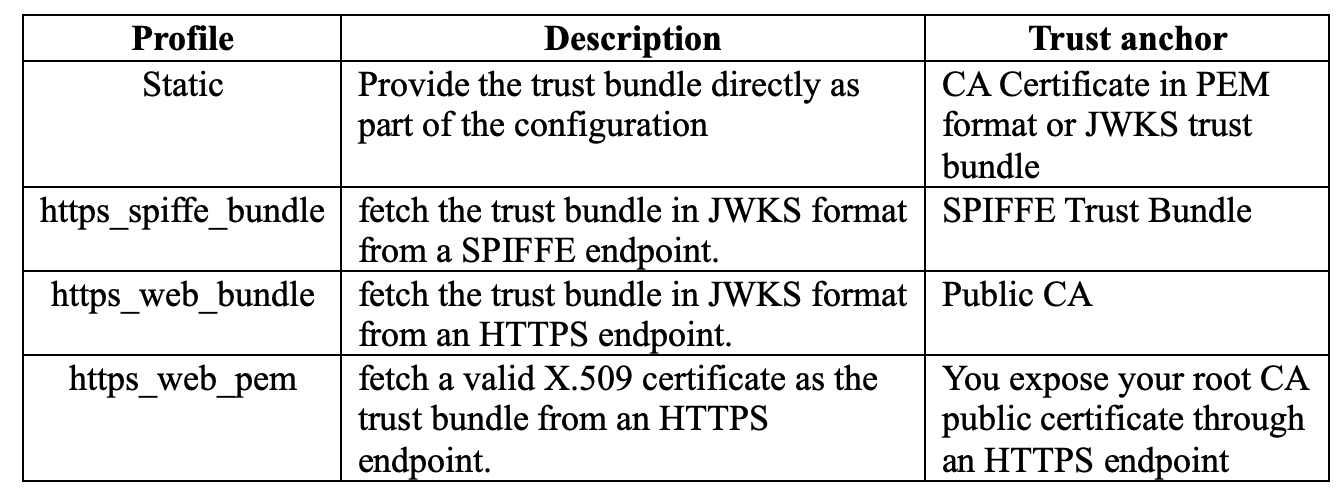
Figure 2: Vault SPIFFE auth methods profile comparison
Step 2: Configuring SPIFFE roles
The SPIFFE role maps the SPIFFE IDs to Vault policies and defines which SPIFFE ID can assume which policy. For more details, refer to HashiCorp API Documentation.
vault write /auth/spiffe/role/vault \

   “workload_id_patterns”=”/django” \

   “token_policies”=\[”default”,”app-a-policy”\] \

   “token_ttl”=”30m”
Figure 3: Configuring SPIFFE roles
Step 3: Minting of SVID (Node Attestation)
You can mint an SVID through a SPIRE Server, or in the case where SPIRE is not used, you can still perform node attestation and workload registration by authenticating using other auth methods, such as K8S or AWS Auth engine, depending on your environment. The diagram below shows the steps involved when SPIRE is not used. Refer to this link for more details on how SPIRE performs node attestation.
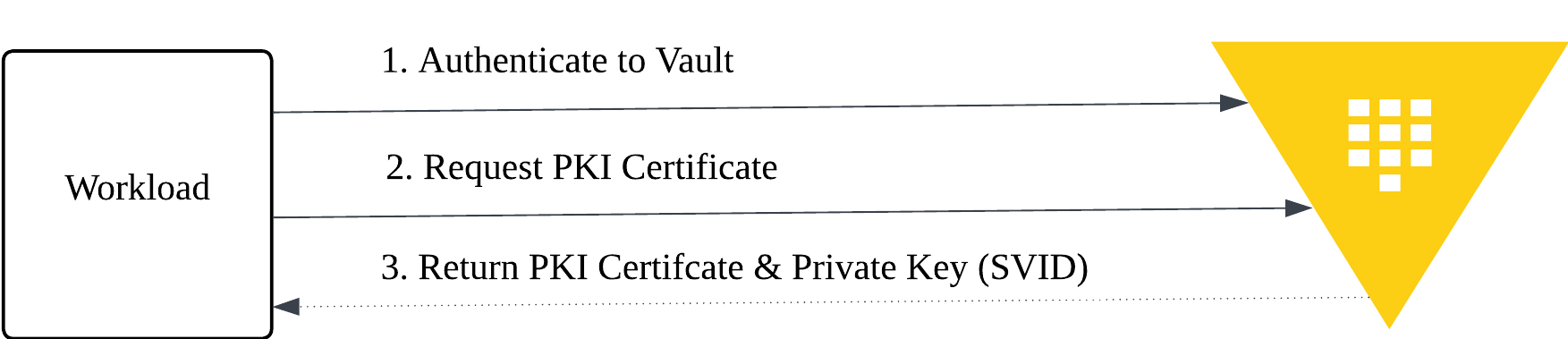
Figure 4: Node attestation and SVID minting using Vault PKI Secret Engine (without SPIRE)
Step 4: Login to Vault
Only the workload provided with an SVID can login to Vault. Figure 4 illustrates the authentication steps.
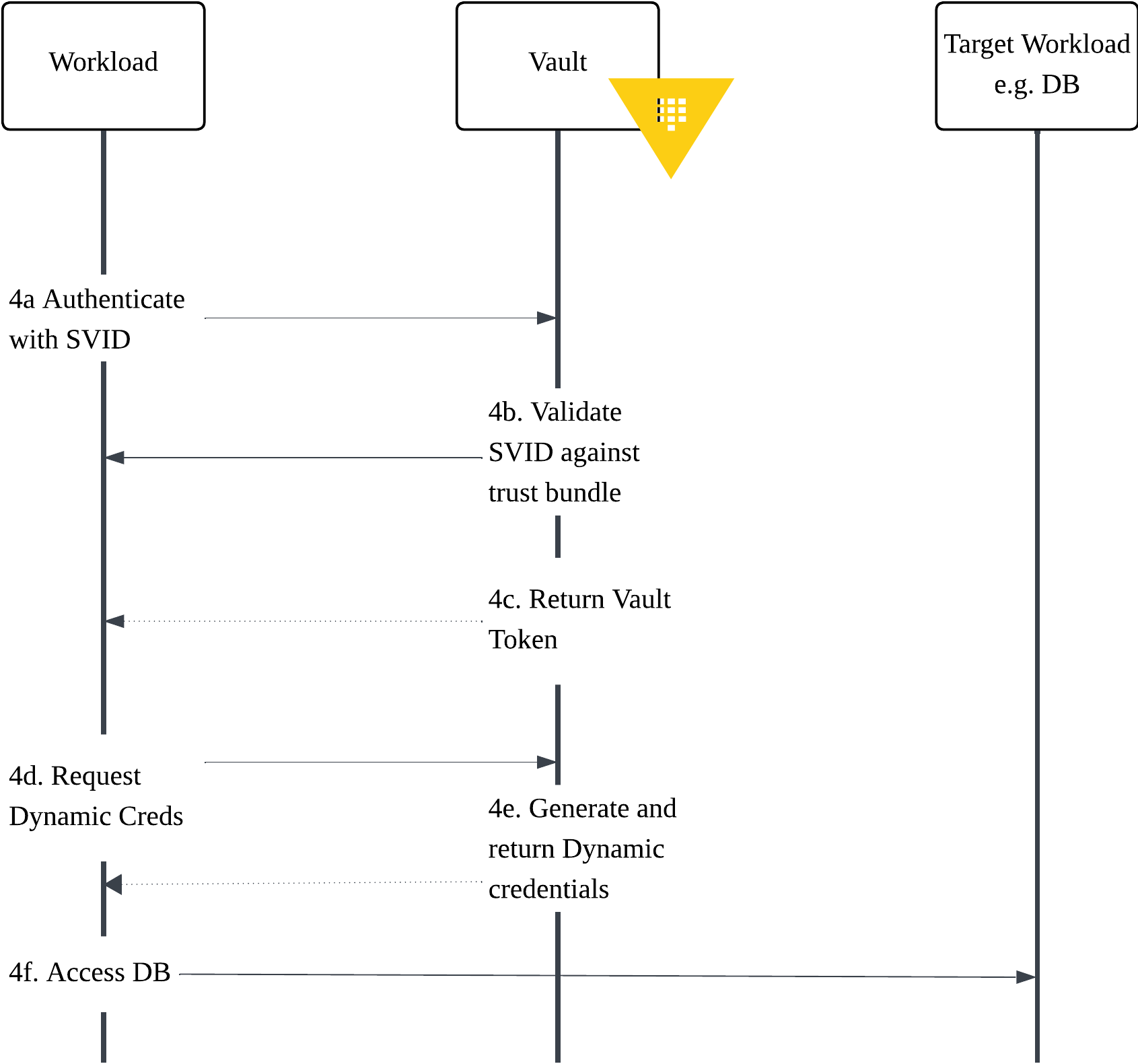
Figure 5: Login to Vault using SPIFFE
Step 4a: Authenticate with SVID
In this example, where the workload is in an OpenShift environment, you can verify the x509 certificate in the workload.
# Check SVID in workload
kubectl exec -n jessica deployment/django-app -- ls -la /vault/secrets
Figure 7: Getting SVID in workload
Output:

Figure 6: Displaying that SVID is injected into pods
The SVID provided to each workload includes the subject alternative name of the SPIFFE ID, which in this example is `spiffe://jessica-demo.me/django`.

Figure 7: Sample SVID – X509 generated with PKI Secret Engine
Step 4b-4c: Validate SVID and return the Vault token
You are now able to login using SPIFFE, which Vault verifies against the trust bundle, and that the workload id matches the one configured in SPIFFE roles. Once validated, it returns a vault token as shown in the output.
 kubectl exec -n jessica deployment/django-app -- sh -c "
   export VAULT_ADDR=<REPLACE_WITH_VAULT_ADDRESS>

 vault write auth/spiffe2/login \
    type=cert \
    role=vault \
    -client-cert=/vault/secrets/tls.crt \
    -client-key=/vault/secrets/tls.key
Figure 8: Login to Vault with SPIFFE SVID
Output:
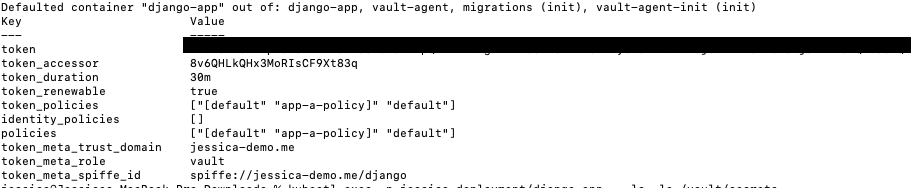
Figure 9: Successful login to SPIFFE
Output – Login using a mismatch SPIFFE ID
When you are trying to login with an unauthorized SPIFFE ID, you can see the following error message in Vault logs:
2025-12-29T05:45:01.490Z [TRACE] auth.spiffe.auth_spiffe_c917e2b6: failed login as no role matched: error=”failed to match SVID to any role”For step 4d-4f: By using a dynamic secret engine such as the database secret engine, it means that your database credentials, when necessary, are provided by the SPIFFE workload.
Refer to the HashiCorp Vault tutorials to configure the dynamic secrets engine: Dynamic secrets for database credential management
A major advantage of integrating Vault with SPIFFE is full auditability at the workload level. Vault records each authentication attempt with the workload’s SPIFFE ID, giving you precise visibility into which pod or service requested access, such as spiffe://isa-tech-lab-ocp2-.../ns/jessica-workload/sa/backend-sa
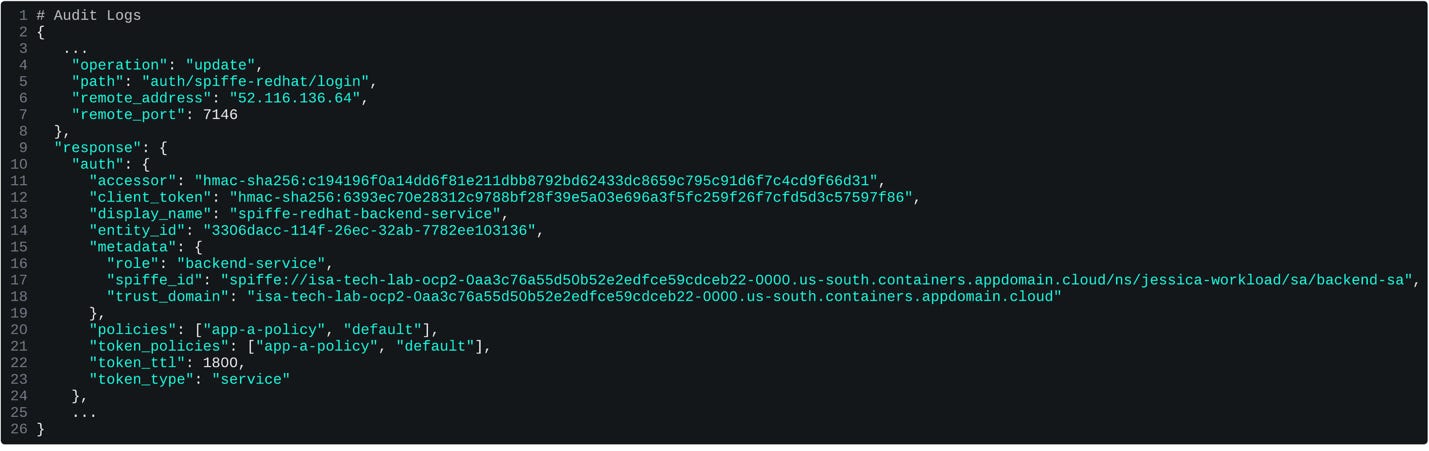
Figure 12: Login successful
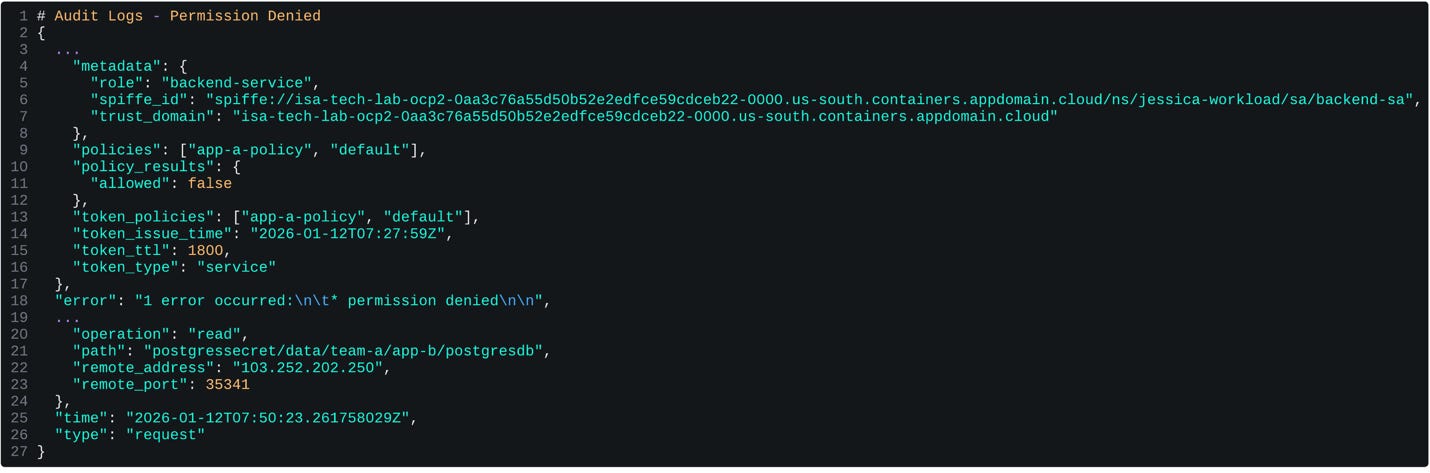
Figure 13: Unauthorized to access kv2 secrets
Get started
Choosing the right approach depends on your specific needs. Implementing SPIRE adds complexity and additional infrastructure components.
In the first scenario, where your primary goal is obtaining platform-agnostic identity – SPIFFE ID for audit purposes rather than a complete SPIFFE deployment, use Vault PKI secrets engine to mint SVIDs and distribute them to workloads using Vault Secrets Operator or Vault Agent.
Alternatively, in the second scenario, where you are looking at retrieving secrets for your workload, Vault's current auth methods enable Vault to leverage platform identity or distribute workload identity to retrieve secrets. Vault can help with many of the NHI challenges highlighted on OWASP for NHI.
SVID proves who a workload is; Once authenticated using SPIFFE auth method, Vault policies govern the retrieval of dynamic secrets, which are generated just-in-time and expire quickly, shrinking the blast radius of any compromise.
Lastly, in the third scenari,o where you are looking at securing your workload-to-workload communication using mTLS, consider the use of service mesh with HashiCorp Vault as the ca provider (to mint SVID), to eliminate the need to embed mTLS logic in every application
To try out Vault, you can get started with HCP Vault or request a demo of Vault Enterprise self-managed.